


Download CyberLink PowerDirector 11 – video editor, video editing software, video production tool, video creation app, video composition software, video editing tool
Overview
CyberLink PowerDirector 11 is a robust video editing software designed for users seeking to produce high-quality video compositions directly from their personal computers. As a dedicated tool in the video editing space, it addresses the need for accessible yet powerful editing capabilities that bridge the gap between amateur creators and professional-grade output. The app caters to a diverse audience, including content creators, educators, independent filmmakers, and hobbyists who require a reliable platform to transform raw footage into polished visual narratives.
Developed by CyberLink Corp., the software leverages advanced integrated technology to enhance visual elements such as facial details, motion tracking, zoom sequences, and panoramic scenes. This intelligent processing helps correct common imperfections like inconsistent lighting or shaky footage, improving overall video clarity and stability. While the developer did not provide additional technical details on specific hardware requirements or optimization strategies, the application’s presence in the market since 2013 underscores its longevity and established role in the video production ecosystem.
Real-world use cases include editing home videos, creating social media content, producing educational materials, and assembling promotional clips. Despite being released in 2013, PowerDirector 11 remains a viable option for users working with legacy systems or preferring a stable, feature-rich environment without the need for constant updates. Its continued relevance highlights its value as a dependable video editing tool within the broader digital content creation landscape.
Key Features & Functionality
- Advanced Integrated Technology: The software uses intelligent algorithms to analyze and enhance key visual elements—such as faces, motion paths, zooms, and panoramic scenes—improving image quality and stability. This feature is particularly useful when refining footage captured under suboptimal conditions.
- User-Friendly Editing Environment: Designed with accessibility in mind, the interface supports users of all experience levels, enabling efficient navigation and quick access to core editing tools. This reduces the learning curve and increases productivity for both beginners and intermediate users.
- Extensive Transition and Effect Options: With over 400 editing tools available, including transitions, filters, and visual effects, users can customize their projects with rich, dynamic elements. These tools allow for creative expression and help elevate the visual appeal of video compositions.
- Comprehensive Editing Toolset: From basic trimming and splitting to advanced color correction and audio synchronization, the software provides a full suite of functionalities. This ensures users have everything needed to complete professional-grade video projects without relying on external applications.
- Intuitive Workflow: The streamlined workflow allows for rapid access to tools and functions, minimizing time spent on setup and maximizing creative output. This design philosophy supports efficient project completion, even for complex edits.
For example, a user creating a travel vlog can use the panoramic scene enhancement to stabilize and refine wide-angle shots, while applying transitions and effects to create a cinematic flow. Similarly, an educator preparing a tutorial video can leverage the intuitive interface to quickly cut and annotate footage, ensuring clarity and engagement.
Interface, UX & Performance
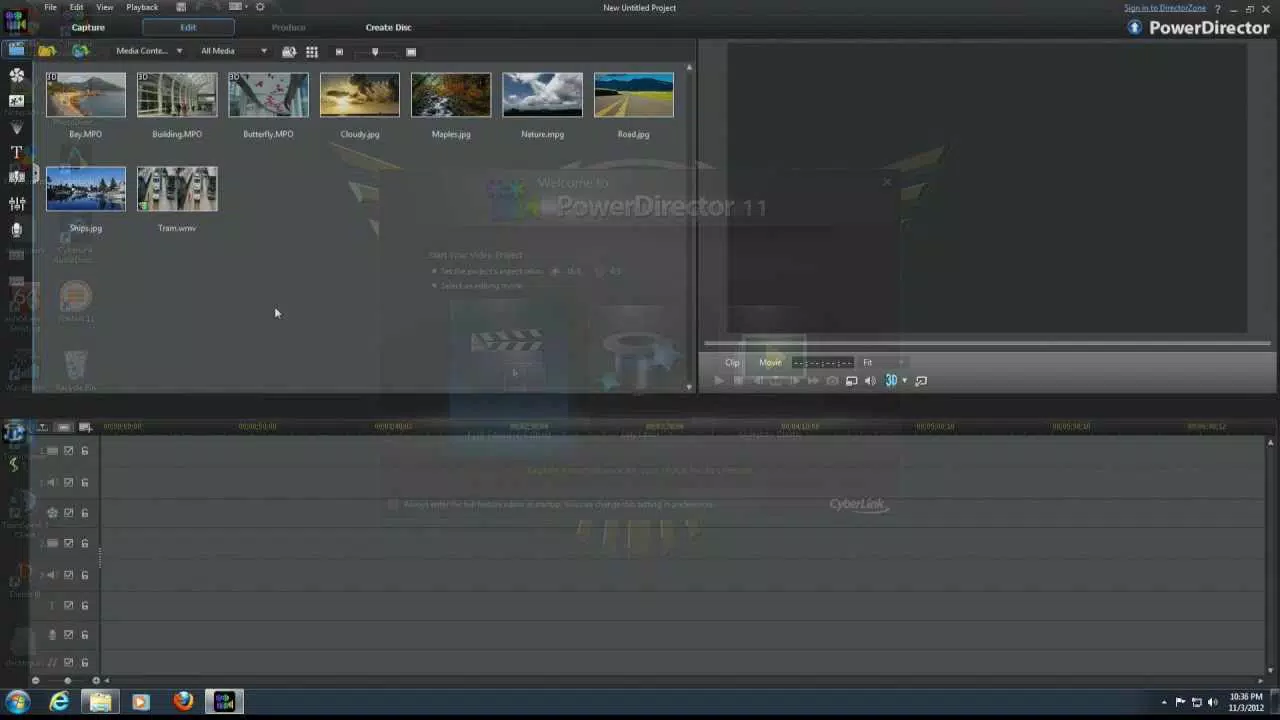
The user interface of CyberLink PowerDirector 11 is structured around a clean, modular layout that organizes tools and functions into logical panels. The visual style emphasizes functionality over ornamentation, allowing users to focus on editing tasks without distraction. Navigation is consistent across major workflows, with clearly labeled buttons, drag-and-drop capabilities, and customizable workspaces.
While the developer did not list formal performance metrics, the application’s design suggests optimized handling of video assets on modern Windows systems. Users can expect responsive interactions during basic editing tasks such as trimming, arranging clips, and applying effects. However, performance may vary depending on hardware configurations, especially when processing high-resolution footage or using multiple effects simultaneously.
Stability appears to be a strong point, given the software’s long-standing presence in the market. Although the developer did not specify compatibility with specific device categories or OS versions beyond Windows, the app’s architecture indicates support for standard desktop environments. Responsiveness during editing sessions is generally reliable, though users with older systems may experience delays when rendering complex projects.
Platform Compatibility & Technical Requirements
CyberLink PowerDirector 11 is available exclusively for the Windows platform. The software requires a Windows operating system, though specific minimum OS versions were not listed by the developer. The application has a file size of 2.5 GB, indicating a substantial installation footprint typical of full-featured video editing tools.
Given the release date of March 10, 2013, the software predates many recent Windows updates and may not be optimized for the latest versions of the OS. Users should verify compatibility with their current system before installation. The developer did not specify minimum RAM, processor, or GPU requirements, so actual performance will depend on individual hardware configurations.
Pros and Cons
Pros
- Comprehensive set of editing tools suitable for diverse video production needs
- Intuitive interface that supports users of varying skill levels
- Extensive library of transitions and visual effects (over 400 tools)
- Advanced technology for enhancing image quality and stability
- Proven track record with a stable release history since 2013
Cons
- Outdated release date may limit compatibility with modern operating systems
- No official support for macOS or mobile platforms
- Missing detailed technical specifications for system requirements
- Limited update frequency since initial release
- Large file size (2.5 GB) may be a concern for users with limited storage
FAQ
Is CyberLink PowerDirector 11 compatible with Windows 10 and Windows 11?
The developer did not specify compatibility with Windows 10 or Windows 11. While some users may be able to run the software on newer systems, performance and stability are not guaranteed.
Can I use CyberLink PowerDirector 11 on a Mac?
No, the software is only available for Windows. There is no official version for macOS or other platforms.
Is the software free to download and use?
No, CyberLink PowerDirector 11 is a paid application priced at $49.99. It is not available as a free download or freemium version.
How often is the software updated?
The last release was in 2013, and the developer has not issued any updates since. Users should expect no future updates or security patches.
Is the installation process secure?
As a product from a reputable developer, CyberLink Corp., the software is considered secure when downloaded from official sources. However, users should avoid third-party sites to prevent potential risks.
Final Thoughts
CyberLink PowerDirector 11 remains a solid choice for users who require a feature-rich video editing environment on Windows, particularly those working with legacy systems or preferring a stable, mature toolset. Its comprehensive editing capabilities, intuitive design, and extensive effect library make it a valuable asset for content creators seeking professional results without the complexity of newer, cloud-dependent platforms.
While its age presents limitations in terms of OS compatibility and modern feature support, its core functionality continues to serve users in educational, personal, and small-scale production settings. For those needing a reliable video editing tool with a proven history, PowerDirector 11 offers tangible value.
Download CyberLink PowerDirector 11 now


